The design · 9 min read
Twelve use cases and one moving bottleneck
The example pipeline and the twelve short stories a visitor walks through. Their one surprise is that raising the bottleneck moves it somewhere else.
Roar Elias Georgsen, 27 August 2026
Part 5 of 13 in Federating a systems model, written for release v0.3.0.
The story so far
The demo is a SysML v2 model of a five-server query pipeline. An adapter serves it through a federated GraphQL router, alongside a capacity service and a document service, with two web apps in front. Part 4 covered the research the design phase began with. This part is the first gate’s output. It sets out what the demo has to show a visitor in fifteen minutes, the example model the demo shows it with, and the twelve use cases that build to one memorable moment.
The design brief opens by quoting the claim I make for the whole project, that federation is the missing integration layer for open model-based systems engineering (MBSE). Then it says what the demo has to do about that claim, in words every later document was measured against:
A SysML v2 model is published as a live, joinable, mechanically checked projection, so that services which know nothing about SysML can attach their own data to the model’s objects. The demo has to make that argument visible in under fifteen minutes to someone who has Docker installed and has never seen SysML. Its one memorable moment is a bottleneck moving.
The brief aims at engineering organisations with fewer than 25 engineers, and three personas carry the use cases:
- The visitor is a developer or architect at such a firm who is weighing up whether federation could connect the tools they already have. “They have Docker, a browser and fifteen minutes, and they will not read a manual.”
- The model owner is a systems engineer who builds the model and wants it to stay the source of truth, so an edit made anywhere has to land in it.
- The document owner is a requirements engineer who owns the ordering and numbering of a requirements document, and “has never seen SysML, and must never need to”.
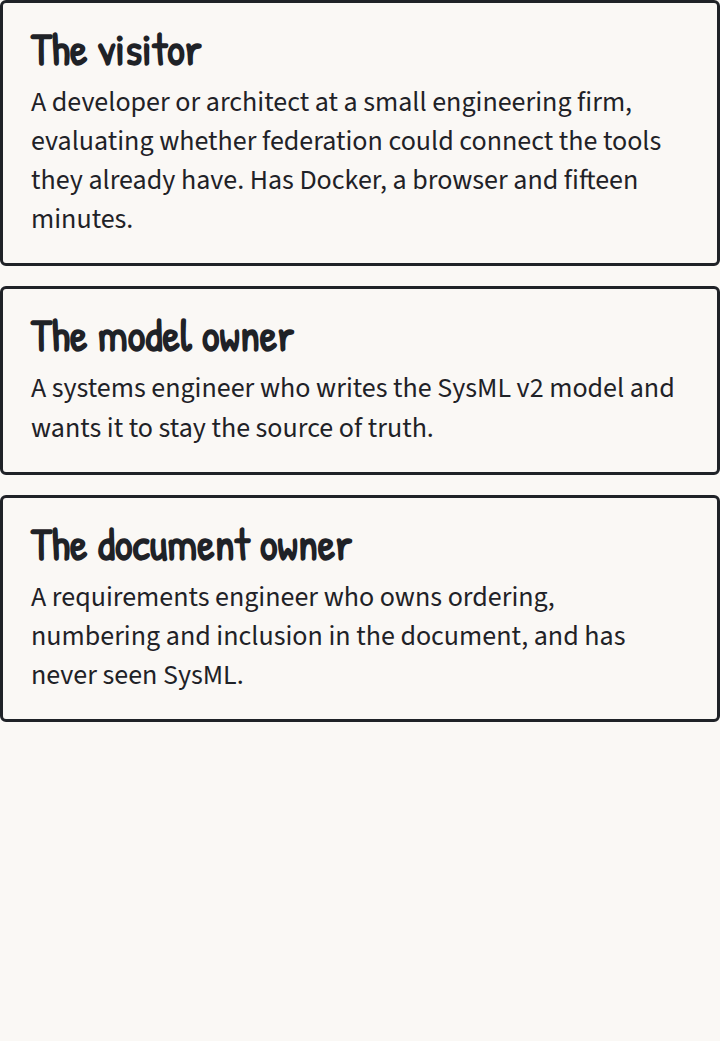
The three personas as they appear on the storyboard, cut from the use-case PDF.
The success criteria are four sentences, quoted whole:
One command launches it on Linux, macOS and Windows with nothing but Docker installed. The bottleneck moving is visible in both apps within two seconds of the edit. A visitor can run one query in the playground that returns text from the adapter, a verdict from the capacity service and a document number from the document service for the same requirement. The whole repository can be read in an afternoon.
That first sentence is what the brief asked for. I build and test on Ubuntu under Windows Subsystem for Linux (WSL), and What shipped, and what did not says how far the other platforms have been checked.
The non-goals fit in one sentence: “Not a product, not a SysML v2 API implementation, no persistence across restarts, no authentication, no multi-user editing, no queueing model, no full language coverage in the adapter.”
The example model
The example is a query processing pipeline of five servers. It has one requirement on the whole pipeline, one requirement derived from it for each server, and one latency requirement with a verification case. Each element has a short name, and the short names are the entity keys every service uses to agree it’s talking about the same thing (short names as keys).
| Short name | Element | Subject and value | Satisfied by |
|---|---|---|---|
PIPE-S1 |
ingest, a Server | throughput 2000 | |
PIPE-S2 |
parse, a Server | throughput 1200 | |
PIPE-S3 |
indexA, a Server | throughput 700 | |
PIPE-S4 |
indexB, a Server | throughput 700 | |
PIPE-S5 |
serve, a Server | throughput 1800 | |
PIPE-P1 |
pipeline, the part that owns the servers and the wiring | capacity and latency declared, no value | |
PIPE-R1 |
the pipeline shall sustain the required query rate | subject pipeline, limit 1500, editable | pipeline |
PIPE-R1.1 |
derived: ingest shall sustain its allocated rate | subject ingest, limit bound to the limit of PIPE-R1 |
ingest |
PIPE-R1.2 |
derived: parse shall sustain its allocated rate | subject parse, limit bound to the limit of PIPE-R1 |
parse |
PIPE-R1.3 |
derived: indexA shall sustain its allocated rate | subject indexA, limit bound to half the limit of PIPE-R1 |
indexA |
PIPE-R1.4 |
derived: indexB shall sustain its allocated rate | subject indexB, limit bound to half the limit of PIPE-R1 |
indexB |
PIPE-R1.5 |
derived: serve shall sustain its allocated rate | subject serve, limit bound to the limit of PIPE-R1 |
serve |
PIPE-R2 |
end-to-end latency shall not exceed a limit | subject pipeline, 200 ms, read-only in both apps | pipeline |
PIPE-VC1 |
a verification case that verifies PIPE-R2 |
The wiring runs from ingest to parse, from parse to both index servers in parallel, and from both of them to serve. As shipped, the pipeline can carry min(2000, 1200, 700 + 700, 1800) = 1200 queries per second. So PIPE-R1 fails against its limit of 1500, and parse is the bottleneck.
Key term Bottleneck
The server, or set of servers, that holds the whole pipeline’s capacity down. Where stages run one after another, it’s the slowest stage. Where a stage is split across parallel servers, those servers count together, so two index servers at 700 each act as one stage of 1400. The capacity service finds it as a minimum cut. That’s the cheapest set of servers that, taken away, would leave no path from the start of the pipeline to the end.
The example model states the requirements and never the arithmetic. Working the number out is the capacity service’s job, and From use cases to requirements shows how. That arithmetic is deliberately simple. I chose it to make a point about federation, and it isn’t meant for real-world use.
The moving bottleneck
Three edits are the whole script:
| Edit | Capacity | PIPE-R1 |
Bottleneck |
|---|---|---|---|
| as shipped | 1200 | FAIL | parse |
| raise ingest to 3000 | 1200 | FAIL | parse |
| raise parse to 1700 | 1400 | FAIL | indexA and indexB |
| then raise indexA to 900 | 1600 | PASS | indexA and indexB |
Raising a server that isn’t the bottleneck leaves the capacity where it was, because a chain carries no more than its weakest stage. Raising the bottleneck helps, but only until the next weakest place takes over, and here that’s the index pair. Only a raise there makes the requirement pass.
The last row has a twist. At 1600 the pipeline now passes, but the derived requirement on indexB, PIPE-R1.4, still fails, because indexB still carries 700 against its allocated 750. indexA is doing more than its share. The shipped requirements document opens with a paragraph of prose that explains exactly that, before anyone reads a verdict.
The tie I nearly shipped
My first draft of the script raised parse to 1600, where the shipped script raises it to 1700. After the next edit, with indexA at 900, that would have left parse at 1600 and the index pair at 900 + 700 = 1600. Two different sets of servers would then limit the pipeline by exactly the same amount, and the bottleneck highlighted on screen would have been whichever one the code happened to find first. For the demo’s one memorable moment, that’s not good enough.
The reading at the first gate caught it. Parse now goes to 1700, so the index pair is always strictly the cheapest cut, and the shipped script never shows a tie. A visitor typing their own values can still make one, so the next gate gave the capacity service a precise rule for which cut it reports when several tie (rollup as maximum flow).
The two apps
The model viewer shows the SysML v2 model as its own text, beside a sketch of the pipeline drawn from the model’s connections. In the sketch you see each server’s throughput, the capacity and the bottleneck, with a failing requirement in red (the viewer shows text beside wiring).
The requirements document shows the same requirements as a numbered document whose numbering is its own. The document owner can reorder, nest, add headings and prose, and hide requirements. Every requirement still shows what the model knows, the verdict from the analysis, and the current value it’s checked against (the document owns its structure).
Exactly six numbers can be edited in the apps: the five server throughputs and the limit of PIPE-R1. You can edit them from either app. Everything else is read-only there. Nonsense and negative values are refused, and the previous value stands. Edits land in the served model and never on disk, which is a stand-in I’ll own up to (editing as scaffolding).
Twelve use cases
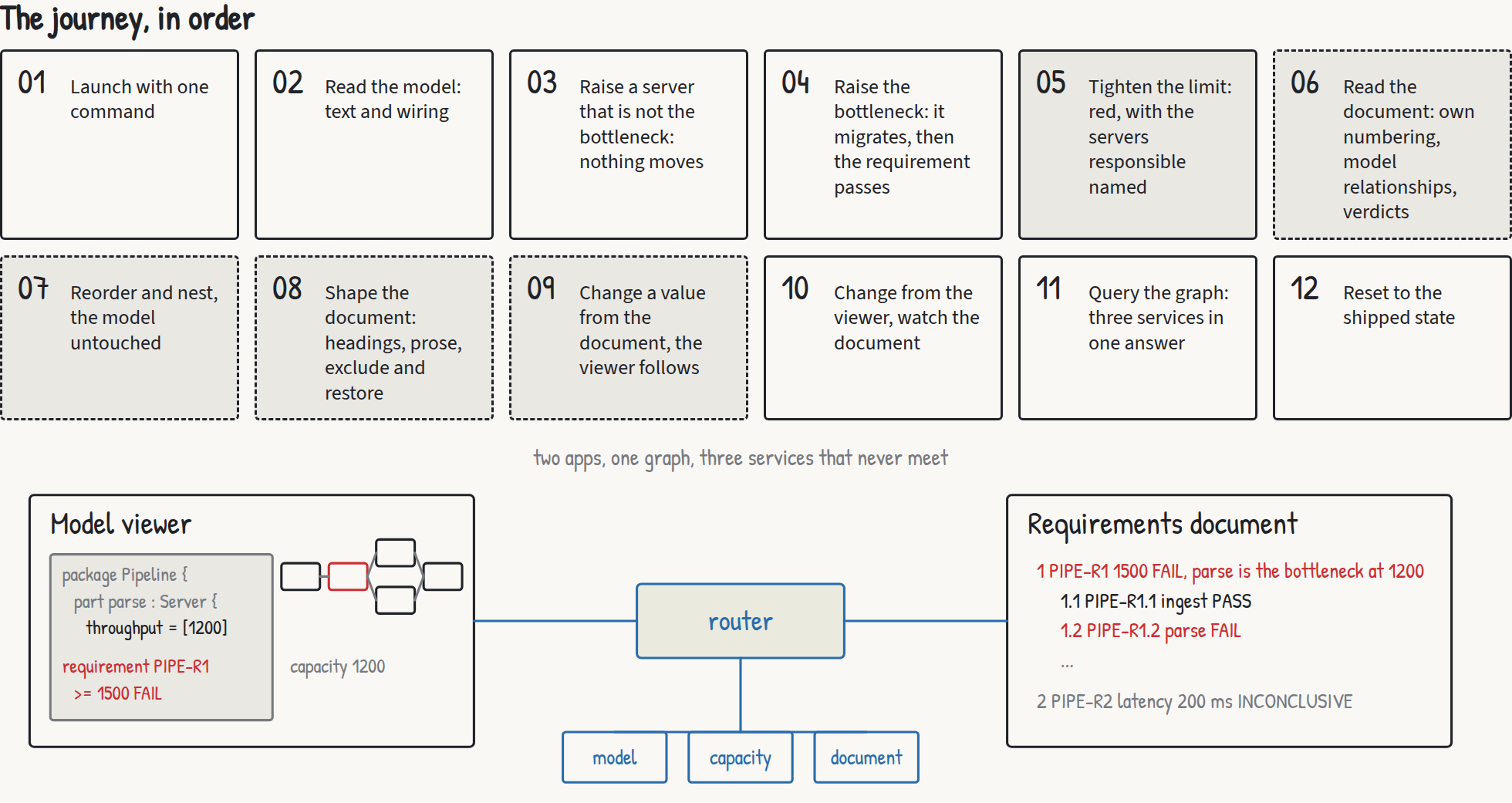
The twelve use cases in the order a visitor meets them, from the overview board of the use-case PDF.
Each use case has a persona and a set of criteria. The criteria say what is observed and leave out which button is pressed. The full criteria are on the storyboard’s page. In outline, they build like this:
- Launch with one command. With the image already pulled, one
docker runrenders both apps within ten seconds, and with no route to the internet they still render fully. - Read the model. The viewer shows the model text, the sketch with parse marked as the bottleneck, and
PIPE-R1failing at 1200 against 1500. - Raise a server that isn’t the bottleneck. Raising ingest to 3000 moves nothing that matters.
- Raise the bottleneck. Parse to 1700 moves the bottleneck to the index pair, and indexA to 900 makes
PIPE-R1pass. - Tighten the limit. The model owner changes the limit of
PIPE-R1, the verdict follows, and the model text shows the new number exactly where the old one was. - Read the document. The document owner sees the requirements numbered the document’s own way, with verdicts from a service that has never parsed a model file.
- Reorder and nest. Moving requirements renumbers the document and leaves the model untouched.
- Shape the document. Adding headings and prose, or hiding requirements, still changes nothing in the model.
- Change a value from the document. The document owner edits a throughput without knowing that the edit changes the model, and the viewer follows within two seconds.
- Change from the viewer and watch the document. The document shows the twist from the last edit above, with the pipeline passing while
PIPE-R1.4fails. - One query in the playground. One response carries text from the adapter, a verdict from the capacity service and a number from the document service, and the served schema has types from all three. Everything before this could, in principle, be faked by one service built for the purpose. This one can’t.
- Reset. Either app puts everything back within two seconds.
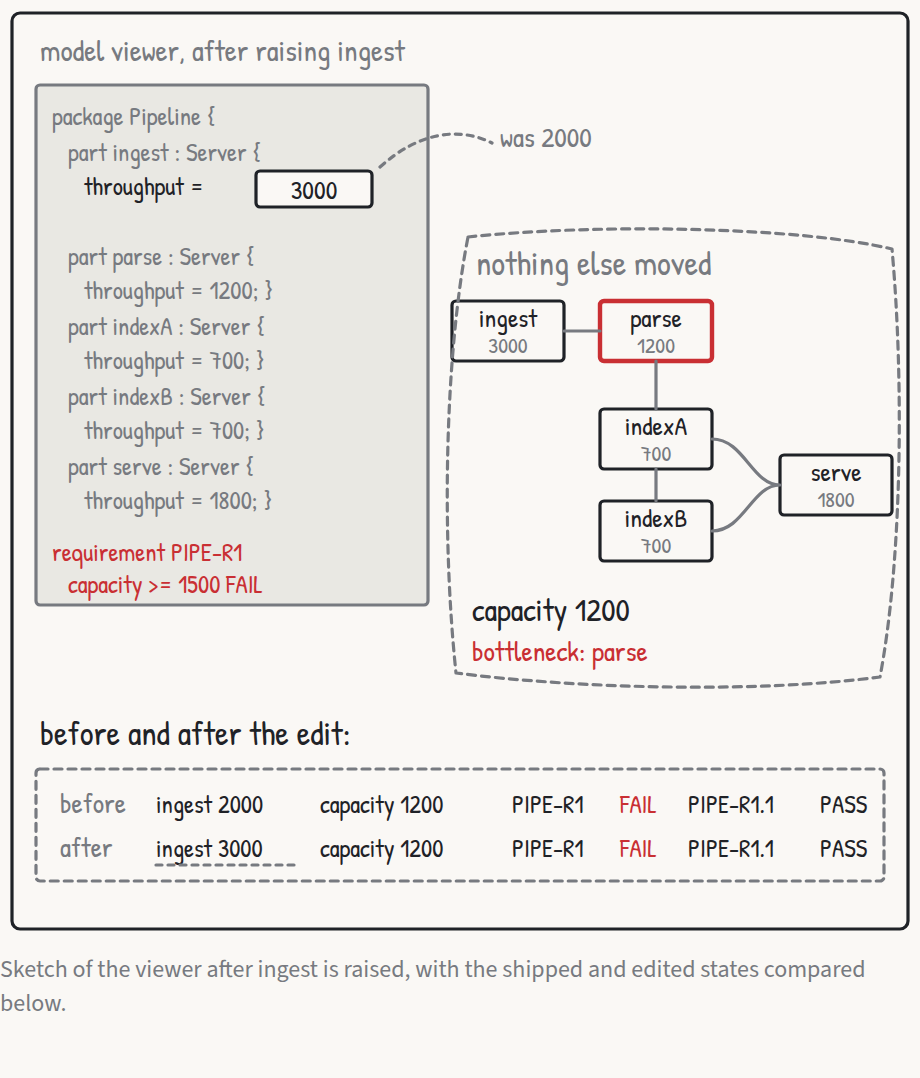
Use case 3: raise ingest to 3000, and capacity, verdict and bottleneck stay put.
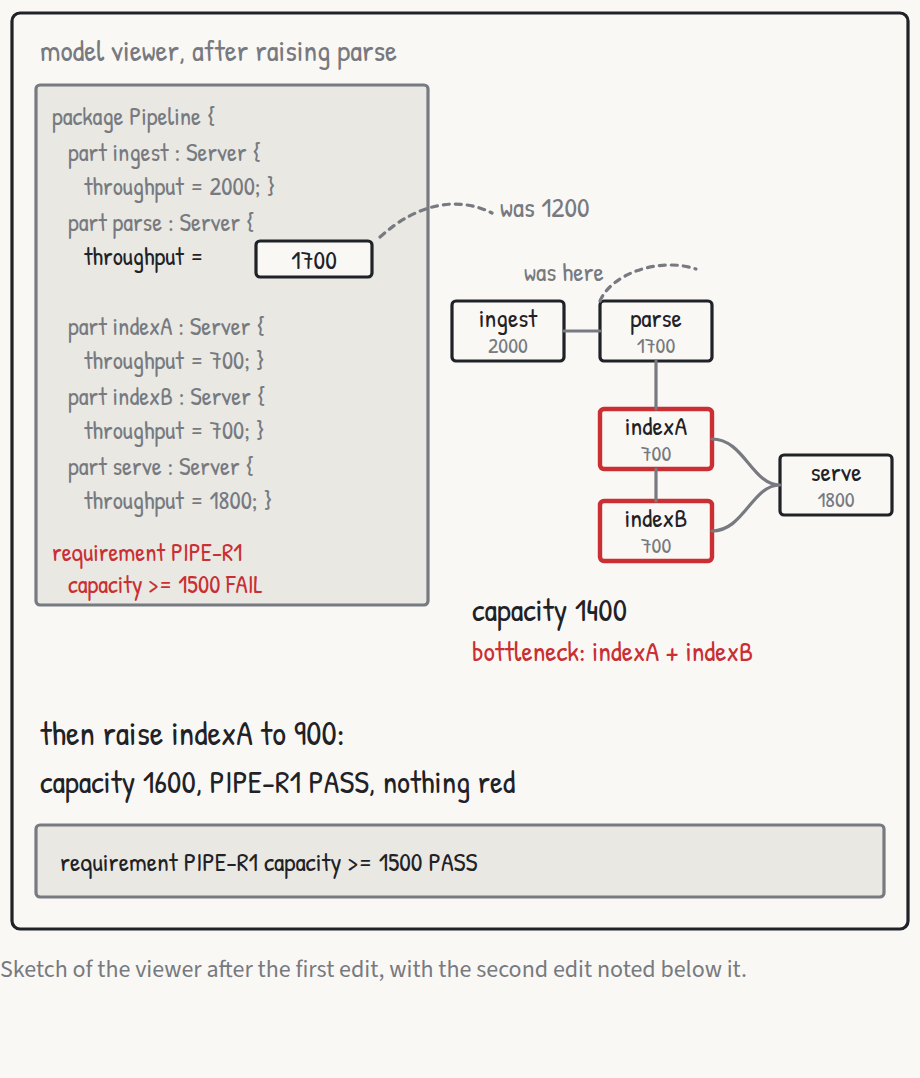
Use case 4: raise parse to 1700, and the cut moves to the index pair.
Part 6 turns these use cases into requirements the code can be tested against.
Previous: What the research overturned · Index: Federating a systems model · Next: From use cases to requirements