Looking back · 14 min read
A model of the demo itself
I take my own advice at last. This article describes the demo as a SysML v2 model that a test keeps in step with the code, with a Checkly session that runs every storyboard story against the live demo.
Roar Elias Georgsen, 13 September 2026
Part 13 of 13 in Federating a systems model, written for release v0.3.0.
The story so far
The demo shipped as one container. Inside it was a SysML v2 model, a capacity analysis and a requirements document. They answer as one graph behind a single router, with two web apps in front. Part 12 gave the size of the published image and said what running it does and doesn’t prove. This last part turns the series’ argument on the demo itself. If a systems model belongs at the centre of an organisation’s engineering, the demo should have one too.
I should have known better
Twelve articles arguing that a systems model belongs at the centre of the engineering, and all that time I described the demo itself in Markdown tables. Mea culpa.
It started as a reasonable call. Early in the design I chose to keep the demo’s own requirements as tables, and the light requirements scheme records why. Someone judging a SysML adapter isn’t judging a way of working, and a model of the requirements could wait until there were more of them than fit on a screen. There were more than that before I’d written the first line of code, and the model kept waiting all through the build.
I should have known better. If you argue that a model belongs at the centre, you had better practise what you preach, and describing your own system properly is one of the basics you don’t get to skip.
So the demo now has a model of its own in SysML v2, in the model/ directory. A unit test fails whenever the model and the repository disagree, and both reference tools for the language read the model on every change to it. The model also brought a check session with it. A model can give every story a test case, but if nothing runs those cases against the live demo on a schedule, it’s still a description with more structure.
Two models in one repository
The repository now holds two SysML v2 models. They describe different things, and it’s worth a minute to keep them apart.
The pipeline model is the example the demo serves. It lives in examples/pipeline/model.sysml and describes five servers wired in series and in parallel, each with a throughput. It states a throughput requirement on the whole pipeline, derives one from it for each server, and adds a latency requirement. The adapter reads this file when it starts. Every board and screenshot that shows ingest, parse or the model requirement PIPE-R1 is showing this file’s content.
The demo model describes the thing doing the serving. It covers the adapter, the capacity and document services beside it, the router that joins the three into one graph, the two web apps that read the graph, and the image they all ship in. Nothing of the pipeline is declared in it, and no running service reads it.
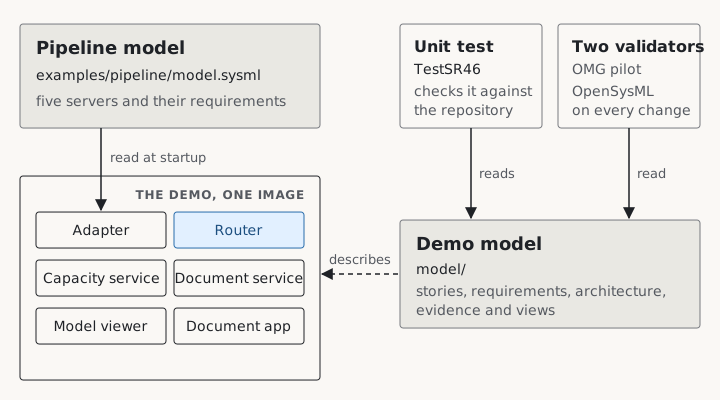
The pipeline model is content the demo serves. The demo model describes the demo, and only tests and validators read it.
You can tell the two apart by the shape of a name. Anything from the example starts with PIPE-, is set in code font, and is always called a model requirement or a model element. The demo’s own identifiers come from the light scheme, where each has a short prefix and a number.
| Identifier | What it names | Example |
|---|---|---|
US-nn |
a story: who wants something from the demo, and why | US-03 |
SR-nn |
a system requirement, something the demo must do | SR-22 |
SC-nn |
a design constraint | SC-07 |
AD-nnnn |
a decision record | AD-0029 |
In the model each story, requirement and constraint identifier becomes a short name, such as <'SR-22'>. It sits in front of a longer name that carries the number and a phrase, such as SR_22_EditsPatchTheSource, so that a relationship reads as a sentence: satisfy SR_22_EditsPatchTheSource by adapter. The numbers were in the articles and the decision records before the model existed, and I left them as they were.
Decision records appear in the model as well. A metadata tag on a part names the records that shaped it, and each story’s rationale cites the records it rests on. From any element you can reach the reason for it without leaving the file.
From a story to its evidence
Key term Traceability
Traceability means you can follow any requirement up to the need that caused it, and down to the part that meets it and the test that shows it is met. Systems engineers keep these links so that a change anywhere shows what else it touches. In a SysML model the links are typed relationships that tools can check, rather than rows in a spreadsheet.
The demo model is built around chains of such links, and one real chain shows the shape.
US-03 is the storyboard’s third story. A visitor raises a server that isn’t the bottleneck and sees that nothing else changes. Several system requirements follow from it, and one is SR-22, “edits patch the source”. When someone edits a number, the adapter must replace that exact number in the model text, rebuild what it serves and increase the version, and no query may ever see the text and the served values disagree. The model says the adapter satisfies SR-22. A verification case, VC_SR_22, lists the evidence: six Go tests across two packages and a recorded run of the demo from 28 August.
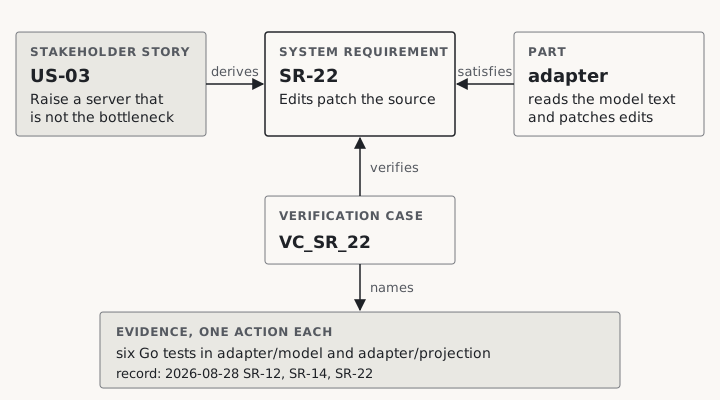
One chain through the model. A system requirement marked done must be derived, satisfied and verified.
The twelve stories of the storyboard became the model’s stakeholder stories, each a SysML requirement with a role, a capability, a benefit and its acceptance criteria. Seven more joined them, one for each system requirement that had traced to an obligation I’d set the project and not to anyone who wanted it, such as keeping every name of the example out of the adapter. A story has a role and a benefit, so now each of those requirements has someone who wants it.
The forty-five system requirements from From use cases to requirements are all there, and three more came with the model: a test that holds the model to the repository, validation by both reference tools, and the check session. Each keeps its EARS statement as an attribute, so the text a case verifies is the text the requirement carries, never a paraphrase.
In part 6 the traceability lived in tables, one per hop, kept by hand. In the model it’s nineteen derivation connections, one per stakeholder story, each linking the story to every system requirement that follows from it. The rule is strict. A system requirement marked done must be derived from a stakeholder story, satisfied by a part of the architecture and verified by a case, and an agreement called coverage names any that isn’t.
Evidence goes by the name it already has. A Go test is named by its function, such as TestSR02_ReadyWithinTenSeconds, a recorded run by its row in the example’s verification record, and a make target as you’d type it. A case names only evidence the repository’s records hold. Where a story asks for more than the records carry, its case claims what’s recorded and nothing more. I’d rather the model admit a gap than paper over it.
The live checks of the check session, which comes later in this part, are cases too. Each check’s case carries the same fields as its entry in the manifest the check project reads.
The test that keeps the model honest
A model that nobody checks is just prose with more brackets. What holds this one in place is a single Go test, TestSR46_ModelAndRepositoryAgree in internal/trace. It reads the model files as text, compares them with the repository around them, and runs one subtest for each of eight agreements.
| Subtest | What must agree |
|---|---|
identifiers |
Every short name the model writes is declared exactly once. Every decision record it names exists, and every record in the directory is named. |
requirementsAffected |
Every requirement a decision record lists as affected is a short name the model declares. |
goTests |
The Go tests that carry a requirement identifier and the tests the model names are the same set, counted per file. |
checkFiles |
The check files under checkly/__checks__ and the file names the model quotes are the same set, and each browser test is exercised by exactly one validation case. |
images |
Every image under docs/img is named by exactly one view, and every image a view names exists. |
coverage |
A system requirement that is done is verified, satisfied and derived. A stakeholder story that is done has exactly one validation case. |
checkInventory |
The model’s check cases and the check manifest carry the same checks with the same fields, each defined once. |
sessionParts |
The services the check session’s compose file starts are the parts the model gives the session, and nothing else. |
The test runs under make check and takes a fraction of a second. From the day it existed, an edit to a check file, a manifest entry or a compose service was also a model edit, or the build went red.
Try it yourself Run the eight agreements yourself
From a clone of the repository, run the eight agreements on their own:
go test -run TestSR46 -v ./internal/trace/Then rename any image under
docs/imgand run it again to watch theimagesagreement fail.
The boards and their views
A SysML view picks out the part of a model that one audience cares about. Every board published in this series now has one, ten in all: the five architecture views, the two A3 sheets, the storyboard, the five-views overview and the app screenshots. A view says what it covers with expose, and nothing is redrawn. The boards stay the hand-drawn PDFs from the design phase.
The images agreement checks the names in both directions, but it can’t check that a drawing shows what its view exposes. So on 12 September I opened each of the thirty-six images once and read it against its view, and the model’s README keeps the result. The reading found three things on the boards that the model didn’t yet hold:
- two panels of the runtime board, a document edit and a reset, which had no action behind them
- the image’s health check, drawn on the deployment board
- the document app’s limit of six levels of nesting, visible in the last screenshot
All three are in the model now. Each is a small thing. Each is also exactly the kind of gap that a careful read of the prose had missed, which is rather the point of this whole article.
Two reference tools on every change
Checking the model against the repository only helps if the model is valid SysML in the first place. make model-check puts the whole model to both reference tools, the OMG pilot implementation and OpenSysML, and fails if either refuses it, warns about it or is missing. Continuous integration runs the same target whenever a file under model/ changes (model validation in CI).
Before I wrote the model, I tried nineteen of the forms it would use on both tools, and both refused one of them. Five more were refused while I wrote the model itself, among them a pair of reserved words, public and connector, that I really should have spotted. The model’s README records each refusal with the form used instead.
Acceptance has limits of its own. A tool that accepts a form hasn’t checked what I meant by it. Both tools accept a require constraint that holds a documentation comment where an expression belongs, and it asserts nothing beyond its comment. The model’s README says which acceptances carry that caveat.
Every story against the live demo
The Go tests check the pieces. I also wanted the whole demo checked from the outside, the way a visitor meets it. A Checkly project runs every storyboard story against a live instance, with browser and API checks on a schedule, and every request the router handles is traced. This is the check session. It lives under checkly/ as a compose profile beside the demo, and each of its thirty checks and monitors is a case in the model too.
The session needs a Checkly account, and my credentials can’t ship inside a public image. So the choice is yours. Bring your own account and you get the whole demo as I ran it, with its checks and traces. Leave it out and docker run starts the demo exactly as before, and nothing under checkly/ is built, run or read.
With an account, one script starts five containers: the demo, a tunnel, an OpenTelemetry collector, a trace viewer and a runner. The tunnel gives Checkly’s runners, out on the internet, a way in to a demo running on your machine. With a token it is a named tunnel on your own hostname. Without one it is a quick tunnel, on a hostname the provider assigns for the length of the session.
Try it yourself Start a session of your own
Put
CHECKLY_API_KEYandCHECKLY_ACCOUNT_IDincheckly/.env, then from the repository root run:bash checkly/scripts/session.sh upAdd
TUNNEL_TOKENandDEMO_HOSTNAMEfor a named tunnel. WithSESSION_WITHOUT_ACCOUNT=1instead of the two account values, the script brings up the stack and the subscription probe and deploys nothing. The check session’s README lists every setting.
The runner records every check against your instance, deploys the checks to run on a schedule, keeps a heartbeat going, and on stop removes everything it deployed. Its twelve steps are logged by number, and each is an action in the model.
Limit Quick tunnels may drop live updates
Quick tunnels are documented as carrying no streamed response, so a page behind one may never hear the server-sent event that tells it to redraw. Seven of the twelve story checks depend on that event. Early in each quick-tunnel session the runner holds a subscription open, makes an edit and waits ten seconds for the event. If none arrives, those seven checks skip with the reason
live updates need the named tunnelrather than fail. A named tunnel runs all twelve.
Following one request through the demo
A failed check tells you that something is wrong. On its own it can’t say where inside the demo the request failed. A trace was the missing part.
The router’s tracing is off in the image, and turning it on is the operator’s choice. A session turns it on by naming a configuration file whose one exporter is the collector. The collector forwards every span to Jaeger, a trace viewer at localhost:16686. With a tracing key and the second collector configuration, it also sends Checkly the spans a check marked as its own, and Checkly shows each one beside the check result that caused it. One join query through the router gives a trace of thirteen spans.
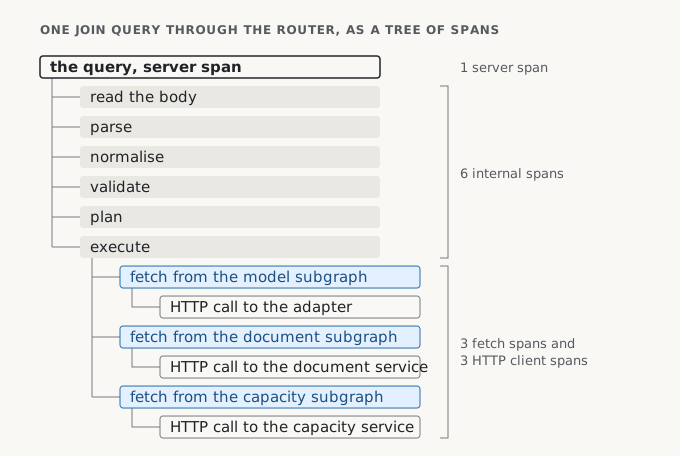
The thirteen spans of one join query, drawn to show which span contains which.
That’s one request, seen end to end across the router and all three services. The router is the only service in the container that could show it without a dependency the design constraints forbid.
What has been run
Every run of the session is dated in the check session’s record. Without an account, the demo started through the compose file answers exactly as docker run does. On 13 September the first full stack came up, on a network whose resolver answered the tunnel service’s name with a block page, so the tunnel never got a hostname. I checked the collector, the trace viewer and the thirteen spans by reaching the demo directly instead. The runs that need an account followed on 14 September, the day after this article was first written, and among them was a named-tunnel session that ran all twelve story checks.
What the model leaves out
The model has no risk register and no priorities. A story carries a status and nothing else from a lifecycle.
Allocation, the link that says which part carries which requirement, is written with satisfy. SysML v2 has an allocation keyword of its own, but there’s no recorded run of either reference tool accepting it, and a form neither tool has been seen to accept doesn’t go into the model. No view declares a rendering either, so nothing generates a diagram from the model.
Two parts of the check session have never run, because both need a paid Checkly plan. One is a private location, which would put Checkly’s runners beside the demo with no tunnel needed. The other is incident automation on the status page, with its weekly maintenance window. Both are written and switched off behind flags, so the project deploys on the free tier as it stands.
One last thing before you start a session. While it runs, the demo answers on a public hostname with no authentication. It holds no secret, so the worst a visitor can do in that window is edit a value and fail a check.
That closes this series. The next one, Automating traceability, takes on automating the federation itself. Before the rest of a system’s tools can join the graph, something has to decide which of their objects are which elements of the systems model, and in this demo that’s still me, by hand.
Decision records: docs/decisions · Repository: https://github.com/Roarge/sysml-federation
Previous: What shipped, and what did not · Index: Federating a systems model · Next series: Automating traceability